
MetaTrader 5 in a nutshell
Free for traders
The full platform — desktop, web, iOS, Android — costs traders nothing. No subscription, no trial clock.
Mobile ratings are exceptional
4.8/5 on both the App Store (73,326 ratings) and Google Play (1,115,872 ratings) — one of the largest validated mobile trading app samples available.
Automation-ready
MQL5 scripting, a built-in strategy tester, and a marketplace of thousands of EAs make MT5 the default choice for algorithmic retail traders.
Trustpilot score is misleading
The 1.3/5 Trustpilot score (197 reviews) reflects broker-side complaints — withdrawals, account issues — not platform functionality. Treat it as a broker-selection warning, not a platform verdict.
Execution depends on your broker
MT5 transmits orders; fill quality, spreads, and slippage are set by the connected broker. Platform choice and broker choice are separate decisions.
MetaTrader 5 is a free, broker-agnostic multi-asset platform with deep charting, MQL5 automation, and more than 1.1 million Google Play ratings averaging about 4.7/5. Its low Trustpilot rating often reflects complaints about connected brokers, which MetaQuotes does not control.
What Is MetaTrader 5?
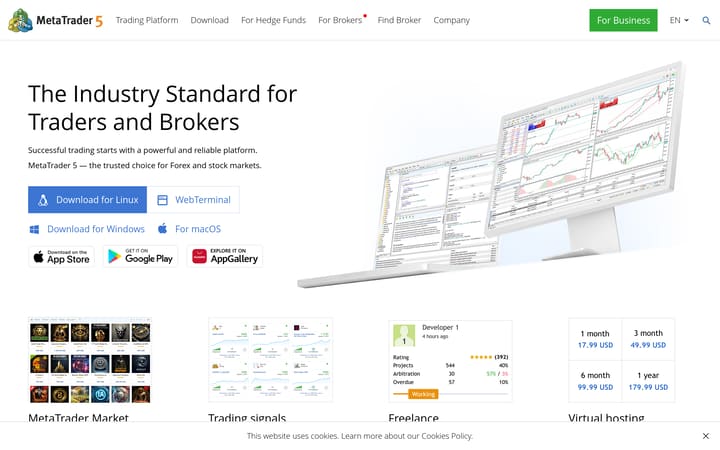
MetaTrader 5 is a multi-asset trading platform developed by MetaQuotes and distributed free of charge to retail traders through their connected brokers. It supports forex, CFDs, equities, and futures within a single terminal, and is available as a desktop application (Windows and macOS via Wine), a browser-based web terminal, and native iOS and Android apps. The platform is used by hundreds of brokers globally, making it one of the most widely deployed retail trading environments in existence.
Charting and Technical Analysis
The terminal ships with 38 built-in technical indicators across trend, oscillator, volume, and Bill Williams categories, alongside 44 analytical objects including Fibonacci retracements, Gann fans, and Elliott wave tools. Twenty-one timeframes — from one minute to monthly — give traders granular multi-timeframe analysis without switching platforms. An integrated economic calendar overlays macro events directly on price charts, a practical feature for traders who blend technical and fundamental approaches.
Automation and Customisation
MQL5 — a C++-like scripting language — underpins MT5's automation layer. Traders and developers use it to write Expert Advisors (EAs) for fully automated strategies, custom indicators, and utility scripts. The built-in strategy tester supports multi-threaded backtesting against tick data, allowing rigorous historical validation before live deployment. The MQL5 Marketplace hosts thousands of free and paid add-ons, and the MQL5.community forum provides one of the largest retail trading developer ecosystems available, with open-source code libraries and a freelance developer exchange for custom work.
Mobile Experience
The iOS and Android apps carry exceptional ratings: 4.8/5 on the App Store from 73,326 ratings, and 4.8/5 on Google Play from over 1.1 million ratings. These are among the largest validated samples for any trading app on either store. The mobile clients support full order management, multi-indicator charting, push-notification alerts, and real-time quotes across all instruments available on the connected broker. Expert Advisors require the desktop terminal or a broker-hosted VPS to run, so automated strategies cannot execute from mobile alone.
Pricing
MT5 is free for traders across all clients — desktop, web, iOS, and Android. There are no subscription tiers, no feature paywalls, and no one-time purchase. Brokers may separately charge for VPS hosting or premium data services, but the platform itself carries no direct cost to the trader.
Understanding the Trustpilot Score
The Trustpilot listing for metatrader5.com shows 1.3/5 from 197 reviews. The overwhelming majority of complaints in that sample concern broker-side issues — withdrawal delays, account restrictions, and trade disputes — that MetaQuotes has no operational role in. MetaQuotes develops and licenses the platform; it does not hold client funds, execute trades, or manage accounts. The mobile app ratings (4.8/5 across more than 1.1 million Google Play reviews) are a more representative signal of platform quality as experienced by traders.
Broker Compatibility
MT5 is offered by a large number of CySEC-regulated brokers including Eightcap, Pepperstone, IC Markets, FP Markets, and XM, as well as FCA-regulated entities such as CFI Financial (FCA license 828955). The platform's broker-agnostic architecture means traders can switch brokers without changing their charting setup, indicator library, or EA codebase — a meaningful practical advantage for active traders.
Have you traded with MetaTrader 5?
Your vote contributes to the community average and headline rating immediately, from the first vote. Click a star to vote — change it any time.
What other platforms say about MetaTrader 5
Reviews aggregated from 3 independent sources.Backed by 1,256,631 source-reported ratings.
- 197 reviewsRead on trustpilot.comCollection date not recorded
- 73.3k reviewsRead on apps.apple.comCollection date not recorded
- 1.2M reviewsRead on play.google.comCollected: 2026-08-23
External sources are weighted by their reported sample count, capped at 5,000 per source. Collection dates may differ;methodology →
Is MetaTrader 5 right for you?
Best for
- Technical analysts — 38 built-in indicators, 21 timeframes, and 44 drawing tools (Fibonacci, Gann, Elliott Wave) support detailed chart-based strategies
- Algo developers — MQL5 scripting language with backtester, strategy tester, and access to a 1M+ developer marketplace for signals and expert advisors
- Multi-asset traders — single platform for forex, CFDs, equities, futures, commodities, and cryptocurrencies (broker-dependent)
- Mobile-first traders — the Android app averages close to 4.8/5 from about 1.2 million Google Play reviews, and the US App Store listing shows 4.8/5 from about 83,000 ratings
- Cost-conscious traders — fully free platform with no subscription, trial expiry, or hidden fees
Avoid if
- Traders seeking broker-side support — MetaTrader 5 support covers the platform only; trading account issues route to your broker
- Traders who need built-in social trading or copy-trading — MT5 has no native copy-trader feature
- Traders unfamiliar with MQL5 scripting who want drag-and-drop strategy builders — MT5 automation requires coding or third-party EA purchases
- Traders in regions where their broker doesn't offer MT5 connectivity — platform availability depends entirely on broker support
Evidence and transparency breakdown
Dimensions our methodology can assess from the evidence stored for this review.
- Company history4.6/ 5 · Excellent
MetaTrader 5 launched in 2010 and has maintained continuous development and market leadership for over 14 years with no major security incidents or rebranding.
- Transparency4.3/ 5 · Good
MetaQuotes publishes detailed documentation, release notes, video tutorials, and maintains a public MQL5 community forum; broker-side data quality and execution transparency depend on the connected broker.
Charting features
Capabilities you'll lean on as a technical trader.
- Chart types
- candlestick, bar, line
- Indicators
- 38
- Drawing tools
- 44
- Multi-chart
- Replay mode
- Alerts engine
- Watchlists
Scripting & automation
Languages supported for custom indicators and strategies.
- MQL5BacktesterMarketplace →
Mobile app
These stored app ratings also contribute to the external score above. Collected: Aug 2026. They are snapshots, not live store ratings.
Customer support
Supported languages: Bulgarian, Dutch, English, French, German, Italian, Malay, Spanish
| Channel | Languages |
|---|---|
| Ticket system | Bulgarian, Dutch, English, French, German, Italian, Malay, Spanish |
Pricing
5.0 /5Fully free for traders — no subscription, no trial expiry.
Pros
- Desktop, web, and mobile clients all free to traders
- No feature tiers or paywalls within the platform
Cons
- Some brokers charge for VPS hosting or premium data feeds separately
Charting
4.5 /538 built-in indicators, 21 timeframes, and 44 drawing objects cover most technical analysis workflows.
Pros
- 38 built-in indicators across all major categories
- 21 timeframes including sub-minute granularity
- 44 drawing/analytical objects including Fibonacci and Gann tools
- Economic calendar overlaid on charts
Cons
- No native tick or Renko chart types without custom indicators
- Chart layout less flexible than some web-native platforms
Data quality
4.2 /5Real-time and historical data quality depends on the connected broker's feed; the platform infrastructure itself is robust.
Pros
- Tick history stored locally for backtesting
- DOM available where brokers expose Level 2 data
- Multi-asset data streams in a single terminal
Cons
- Historical data depth and tick quality vary by connected broker
Order execution
4.0 /5Execution quality is determined by the connected broker; the platform supports all major order types and one-click trading.
Pros
- Full order-type suite including stop-limit and trailing stop
- One-click trading from chart and DOM
- EA-driven order management with VPS co-location support
Cons
- Fill quality and slippage are broker-dependent, not platform-controlled
Customisation
4.5 /5MQL5 scripting, a large third-party marketplace, and template/profile saving make MT5 one of the most customisable retail platforms available.
Pros
- MQL5 scripting for EAs, indicators, and scripts
- Thousands of free and paid add-ons in the MQL5 Marketplace
- Saveable chart templates and workspace profiles
- Dockable, rearrangeable interface panels
Cons
- MQL5 has a steep learning curve for traders without programming background
- Third-party marketplace quality is inconsistent — vetting required
Community & research
4.0 /5The MQL5 community is one of the largest retail trading developer ecosystems globally, with active forums and a signals marketplace.
Pros
- MQL5.community forum and code library with extensive open-source content
- Integrated signals marketplace with published provider statistics
- Freelance developer exchange for custom EA/indicator work
Cons
- Signal provider quality varies — no independent audit of all providers
- Forum content skews toward MQL5 programming rather than trading strategy
Education
3.8 /5MetaQuotes provides structured documentation and video tutorials; broker-side education varies widely.
Pros
- Comprehensive built-in help system covering all platform features
- MQL5.community education articles and worked examples
- Bar-by-bar replay in strategy tester for manual strategy practice
Cons
- Education skews technical/programming — less suited to pure discretionary traders
- No structured beginner course built into the platform itself
Customer support
3.2 /5MetaQuotes provides support via the MQL5.community helpdesk; day-to-day trading support routes through the connected broker.
Pros
- MQL5.community forum provides fast peer support for technical issues
- Formal helpdesk available for platform-level bugs and licensing
Cons
- Trustpilot score 1.3/5 (197 reviews) — largely broker complaints misattributed to the platform
- No live chat or phone support from MetaQuotes directly
Frequently asked questions
Is MetaTrader 5 free to use?
Yes. MetaTrader 5 is completely free — no subscription fees, no trial expiry, no hidden charges. The desktop and mobile apps are free downloads, and all core features (charting, 38 indicators, MQL5 scripting, backtesting, alerts) are included at no cost.What markets can I trade on MetaTrader 5?
MetaTrader 5 supports Forex, CFDs, Equities, Futures, Commodities, and Cryptocurrencies — but the specific instruments available depend on your connected broker. The platform itself is market-agnostic; your broker determines what you can trade.How many indicators and timeframes does MT5 have?
MetaTrader 5 includes 38 built-in indicators and supports 21 timeframes (M1 to MN). It also offers 44 analytical drawing objects, including Fibonacci, Gann, and Elliott Wave tools, covering most technical analysis workflows.Can I automate trading strategies on MetaTrader 5?
Yes. MetaTrader 5 uses MQL5, a powerful scripting language for building Expert Advisors (automated trading bots), custom indicators, and scripts. The platform includes a built-in backtester, and the MQL5 marketplace hosts thousands of third-party strategies and tools.What are MetaTrader 5's mobile app ratings?
MetaTrader 5 is available on both iOS and Android. Its Google Play listing averages close to 4.8/5 from about 1.2 million reviews, and the US App Store listing shows 4.8/5 from about 83,000 ratings. Scores differ slightly between country stores.Why is MetaTrader 5's Trustpilot rating so low?
MetaTrader 5's Trustpilot page collects many complaints about brokers, such as order execution and withdrawal delays, which the platform itself does not control. For the app experience, the store ratings are a more direct signal: close to 4.8/5 on Google Play from about 1.2 million reviews and 4.8/5 on the US App Store. MetaQuotes does not hold client funds or execute trades, so check the broker you plan to use separately.What support languages does MetaTrader 5 offer?
MetaTrader 5 support is available in Bulgarian, Dutch, English, French, German, Italian, Malay, and Spanish. Support is provided via the MQL5.community helpdesk, ticket system, and community forum.How customisable is MetaTrader 5?
MetaTrader 5 is highly customisable. You can write custom indicators and Expert Advisors in MQL5, browse thousands of third-party tools on the MQL5 marketplace, save custom templates and profiles, and adjust the interface layout. The MQL5 community is one of the largest retail trading developer ecosystems globally.
Compare MetaTrader 5 directly
Compare features, costs and practical differences side by side.
Top alternatives
Other reviewed services to compare if MetaTrader 5 isn't the right fit.
Trader reports
1 community vote on MetaTrader 5.
No written reports yet. Submit yours above — it appears here once approved by editorial.
Reports stay public — only spam, scam promotion, and personal attacks get removed. Read the policy.
Pick two and compare
Spread, leverage, regulation, payout — same row, side by side.
Build your own